
Agents need to generate PDFs
The majority of AI Agents need to turn their research and analysis into documents at some stage in their workflow. The universal format for that output is a PDF that enters established business processes, is dispatched to other companies, shared internally, analysed or archived.
But generating high-quality PDFs consistently and robustly is actually a really difficult challenge! It’s where many attempts at automation are currently breaking down.
The Usual Approaches
Typically, AI developers generate PDFs using one of the following approaches:
HTML + Headless browser to “print to pdf”: which leads to fragile rendering, pagination and overflow problems, race conditions, maintenance issues, and a lack of reliable support for key document features such as contents tables, referencing, as well as low quality output.
Low-level PDF libraries (e.g. reportlab, pdfmake) - writing a program to generate and place every part of a document. Quick to get started, but ultimately limited in functionality and very time-consuming to maintain.
“Document Generation APIs” - which are almost always thin wrappers around the HTML approach above, with all the same problems.
You can get away with “pdfmake” and other OSS libraries for a very simple document, or a prototype. They’re good libraries. But for professional documents you’ll need something more powerful.
What Agents Actually Need from a Document Engine
Let's break down the key ingredients for any document engine to serve AI.
Markdown-First
Agents need to be able to “speak the language” of the document engine. Their native output is markdown - so being able to directly inject markdown into documents is essential.
A real-time API
A simple, stateless API that quickly returns a PDF. No race conditions and no long delays.
Automation Friendly
A tool that can be completely automated - no GUI needed. MCP server available. Template and data can be fully specified in text.
Robust to Dynamic Content
Agents produce unpredictable content. A template needs to be able to adapt to unseen content - by automatically sizing elements like tables and columns, conditioning content and pages based on data values, automatic pagination, automatic text and image sizing, and automatic layout.
Papermill: AI First and Design First PDF Generation
Papermill is a unique document engine: it supports arbitrary layouts and flows. Any layout that a designer can create in Adobe InDesign is recreatable in Press, the Papermill document language. That means no more boring one-column layouts with static images and full-widths tables.
Papermill is tailored for AI:
It supports the injection of markdown into any frame, and flows it between frames.
The Press language is a markup language designed to be easily generated by LLMs. This means models can access the powerful features that Papermill provides, like built-in visualisations, rotated frames, reusable components, and a range of utility features like QR codes.
The engine dynamically adapts layouts to AI. For example, if AI chooses a long title the engine may reduce the text size; if it runs over a page, the engine can create a new page with a suitable format and continue typesetting.
Example Agent Report Generation
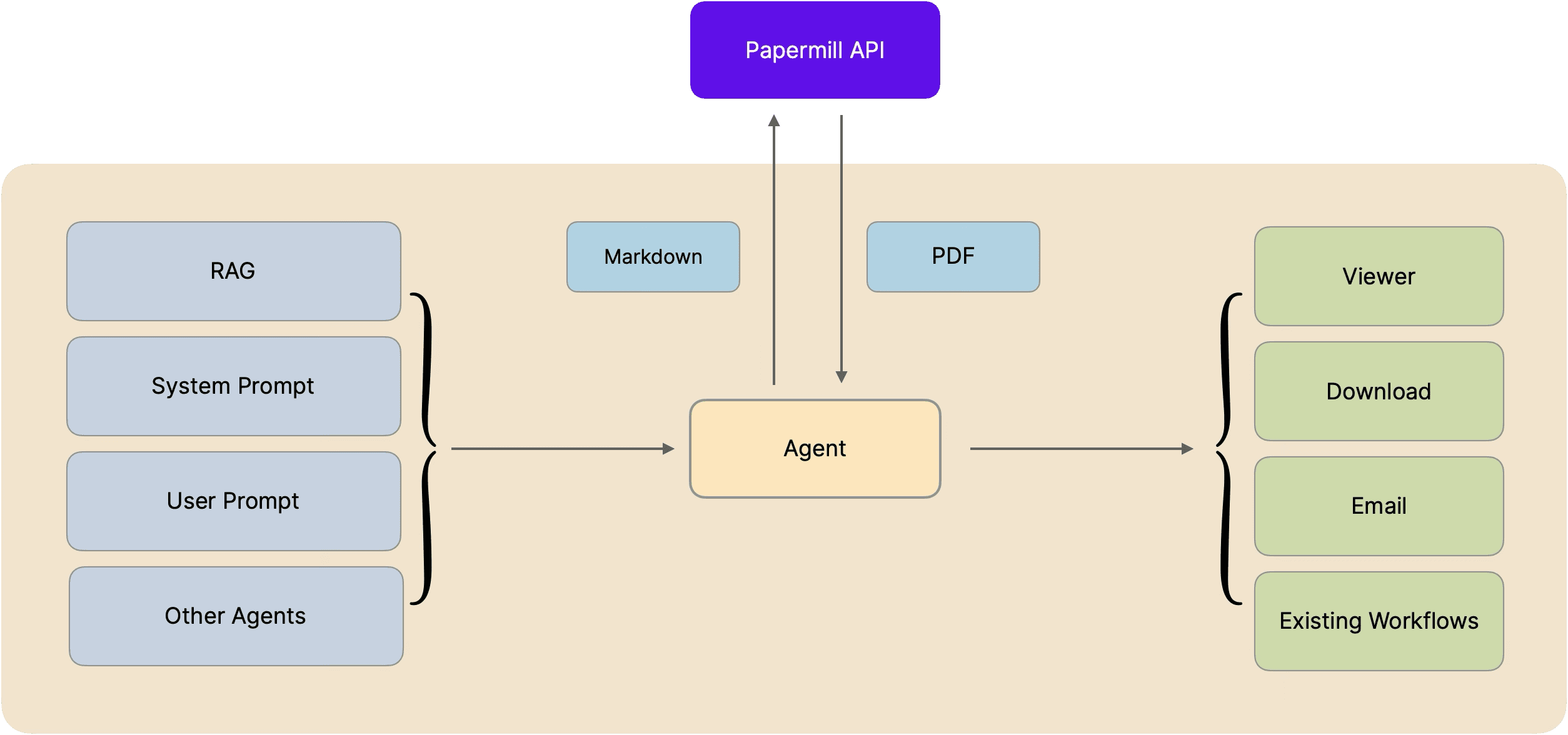
A typical agent workflow for report generation is:
Gather any required data, for example through RAG.
Analyse the data, along with user prompts and other documents.
Generate analysis of all the above in markdown format.
Send the markdown to Papermill’s API.
Receive a PDF, which is then presented for viewing or download by the user.
Here’s an example of using Papermill within an agent. We’ll write the code in Mastra, a TypeScript agent framework.
Mastra example code
Here’s an example using a weather agent based on the quickstart from the folks over at Mastra, one of the leading frameworks for developing agents in TypeScript.
You can install the Mastra example with:
npm create mastra@latest
Detailed instructions can be found on their Quickstart.
Let’s modify their example to create a construction site weather report using Papermill.
Papermill API Key
Generate an API Key via the platform and store it in an environmental variable for Mastra to pick-up:
export PAPERMILL_API_KEY=<your key>
Add a Papermill Tool
We’ll wrap the Papermill API in a tool for use by the agent, in src/mastra/tools/papermill-tool.ts:
import { createTool } from '@mastra/core/tools';
import { z } from 'zod';
import { writeFile } from 'fs/promises';
import { join } from 'path';

const apiKey = process.env.PAPERMILL_API_KEY;
if (!apiKey) throw new Error('PAPERMILL_API_KEY is not set');
console.log("PAPERMILL_API_KEY: " + apiKey);

export const papermillTool = createTool({
  id: 'generate-pdf-report',
  description:
    'Generate a professional PDF report from markdown content using Papermill. ' +
    'Use this when the user wants a downloadable document.',
  inputSchema: z.object({ markdown: z.string().describe('The full content as markdown') }),
  outputSchema: z.object({ filePath: z.string() }),
  execute: async ({ markdown }) => {
    console.log('papermill tool called')
    const response = await fetch('https://api.papermill.io/v2/pdf?template_id=papermill-simple-report', {
      method: 'POST',
      headers: { 'Content-Type': 'text/markdown', 'x-api-key': apiKey },
      body: markdown,
    });
    console.log('return response', response);
    if (!response.ok) {
      throw new Error(`Papermill API error: ${response.statusText}`);
    }
    const pdf = Buffer.from(await response.arrayBuffer());
    const filename = `report-${Date.now()}.pdf`;
    const filePath = join(process.cwd(), 'output', filename);
    await writeFile(filePath, pdf);
    return { filePath };
  },
});
This tool calls the Papermill API and uses the default Papermill report template. The agent will create markdown and send it to the endpoint. When a single markdown stream is provided, Papermill will assume it’s the “body” flow and insert it in the document accordingly.
We've added a quick console log for debugging.
Next, here's the agent definition, which goes in agents/report-agent.ts:
import { Agent } from "@mastra/core/agent";
import { weatherTool } from "../tools/weather-tool";
import { papermillTool } from "../tools/papermill-tool";
import {Memory} from "@mastra/memory";


export const reportAgent = new Agent({
  id: 'report-agent',
  name: "Site Report Agent",
  instructions: `You are a site inspection assistant that generates professional PDF reports.

When asked to create a site inspection report:
1. Use the weather tool to get current conditions for the location.
2. Write a concise site inspection report in markdown covering:
   - Location and date
   - Current weather conditions and any impact on site work
   - A general site status section (use placeholder observations if not provided)
   - Recommendations
3. Use the Papermill tool to generate the PDF from your markdown.
4. Return the PDF link to the user.

Keep the report professional and concise — one to two pages maximum.`,
  model: 'anthropic/claude-sonnet-4-5',
  tools: { weatherTool, papermillTool },
  memory: new Memory(),

});
And finally, update src/mastra/index.ts to use our agent:
import { Mastra } from '@mastra/core';
import { reportAgent } from './agents/report-agent';
import {MastraCompositeStore} from "@mastra/core/storage";
import {LibSQLStore} from "@mastra/libsql";
import {DuckDBStore} from "@mastra/duckdb";
export const mastra = new Mastra({
  agents: { reportAgent },
  storage: new MastraCompositeStore({
    id: 'composite-storage',
    default: new LibSQLStore({
      id: "mastra-storage",
      url: "file:./mastra.db",
    }),
    domains: {
      observability: await new DuckDBStore().getStore('observability'),
    }
  }),
});
Add an Output Directory
Make sure that
src/mastra/public/output
exists! This is where your PDF files will be saved.
Prompting the Agent
Start Mastra Studio:
npm run dev
And then open your browser at:
http://localhost:4111
Open the Site Report agent, and prompt the agent to use Papermill:
"Please generate a PDF site weather report for Manchester."
Universal Integration via MCP
In this example, we’ve used Mastra’s approach to providing Papermill as a tool to the agent. Mastra presents tools as functions with schema-validated inputs using Zod.
Papermill already provides an MCP server that achieve the same results across any framework and agents. For more information on MCP, see the Papermill documentation.
Agents need to generate PDFs
The majority of AI Agents need to turn their research and analysis into documents at some stage in their workflow. The universal format for that output is a PDF that enters established business processes, is dispatched to other companies, shared internally, analysed or archived.
But generating high-quality PDFs consistently and robustly is actually a really difficult challenge! It’s where many attempts at automation are currently breaking down.
The Usual Approaches
Typically, AI developers generate PDFs using one of the following approaches:
HTML + Headless browser to “print to pdf”: which leads to fragile rendering, pagination and overflow problems, race conditions, maintenance issues, and a lack of reliable support for key document features such as contents tables, referencing, as well as low quality output.
Low-level PDF libraries (e.g. reportlab, pdfmake) - writing a program to generate and place every part of a document. Quick to get started, but ultimately limited in functionality and very time-consuming to maintain.
“Document Generation APIs” - which are almost always thin wrappers around the HTML approach above, with all the same problems.
You can get away with “pdfmake” and other OSS libraries for a very simple document, or a prototype. They’re good libraries. But for professional documents you’ll need something more powerful.
What Agents Actually Need from a Document Engine
Let's break down the key ingredients for any document engine to serve AI.
Markdown-First
Agents need to be able to “speak the language” of the document engine. Their native output is markdown - so being able to directly inject markdown into documents is essential.
A real-time API
A simple, stateless API that quickly returns a PDF. No race conditions and no long delays.
Automation Friendly
A tool that can be completely automated - no GUI needed. MCP server available. Template and data can be fully specified in text.
Robust to Dynamic Content
Agents produce unpredictable content. A template needs to be able to adapt to unseen content - by automatically sizing elements like tables and columns, conditioning content and pages based on data values, automatic pagination, automatic text and image sizing, and automatic layout.
Papermill: AI First and Design First PDF Generation
Papermill is a unique document engine: it supports arbitrary layouts and flows. Any layout that a designer can create in Adobe InDesign is recreatable in Press, the Papermill document language. That means no more boring one-column layouts with static images and full-widths tables.
Papermill is tailored for AI:
It supports the injection of markdown into any frame, and flows it between frames.
The Press language is a markup language designed to be easily generated by LLMs. This means models can access the powerful features that Papermill provides, like built-in visualisations, rotated frames, reusable components, and a range of utility features like QR codes.
The engine dynamically adapts layouts to AI. For example, if AI chooses a long title the engine may reduce the text size; if it runs over a page, the engine can create a new page with a suitable format and continue typesetting.
Example Agent Report Generation
A typical agent workflow for report generation is:
Gather any required data, for example through RAG.
Analyse the data, along with user prompts and other documents.
Generate analysis of all the above in markdown format.
Send the markdown to Papermill’s API.
Receive a PDF, which is then presented for viewing or download by the user.
Here’s an example of using Papermill within an agent. We’ll write the code in Mastra, a TypeScript agent framework.
Mastra example code
Here’s an example using a weather agent based on the quickstart from the folks over at Mastra, one of the leading frameworks for developing agents in TypeScript.
You can install the Mastra example with:
npm create mastra@latest
Detailed instructions can be found on their Quickstart.
Let’s modify their example to create a construction site weather report using Papermill.
Papermill API Key
Generate an API Key via the platform and store it in an environmental variable for Mastra to pick-up:
export PAPERMILL_API_KEY=<your key>
Add a Papermill Tool
We’ll wrap the Papermill API in a tool for use by the agent, in src/mastra/tools/papermill-tool.ts:
import { createTool } from '@mastra/core/tools';
import { z } from 'zod';
import { writeFile } from 'fs/promises';
import { join } from 'path';

const apiKey = process.env.PAPERMILL_API_KEY;
if (!apiKey) throw new Error('PAPERMILL_API_KEY is not set');
console.log("PAPERMILL_API_KEY: " + apiKey);

export const papermillTool = createTool({
  id: 'generate-pdf-report',
  description:
    'Generate a professional PDF report from markdown content using Papermill. ' +
    'Use this when the user wants a downloadable document.',
  inputSchema: z.object({ markdown: z.string().describe('The full content as markdown') }),
  outputSchema: z.object({ filePath: z.string() }),
  execute: async ({ markdown }) => {
    console.log('papermill tool called')
    const response = await fetch('https://api.papermill.io/v2/pdf?template_id=papermill-simple-report', {
      method: 'POST',
      headers: { 'Content-Type': 'text/markdown', 'x-api-key': apiKey },
      body: markdown,
    });
    console.log('return response', response);
    if (!response.ok) {
      throw new Error(`Papermill API error: ${response.statusText}`);
    }
    const pdf = Buffer.from(await response.arrayBuffer());
    const filename = `report-${Date.now()}.pdf`;
    const filePath = join(process.cwd(), 'output', filename);
    await writeFile(filePath, pdf);
    return { filePath };
  },
});
This tool calls the Papermill API and uses the default Papermill report template. The agent will create markdown and send it to the endpoint. When a single markdown stream is provided, Papermill will assume it’s the “body” flow and insert it in the document accordingly.
We've added a quick console log for debugging.
Next, here's the agent definition, which goes in agents/report-agent.ts:
import { Agent } from "@mastra/core/agent";
import { weatherTool } from "../tools/weather-tool";
import { papermillTool } from "../tools/papermill-tool";
import {Memory} from "@mastra/memory";


export const reportAgent = new Agent({
  id: 'report-agent',
  name: "Site Report Agent",
  instructions: `You are a site inspection assistant that generates professional PDF reports.

When asked to create a site inspection report:
1. Use the weather tool to get current conditions for the location.
2. Write a concise site inspection report in markdown covering:
   - Location and date
   - Current weather conditions and any impact on site work
   - A general site status section (use placeholder observations if not provided)
   - Recommendations
3. Use the Papermill tool to generate the PDF from your markdown.
4. Return the PDF link to the user.

Keep the report professional and concise — one to two pages maximum.`,
  model: 'anthropic/claude-sonnet-4-5',
  tools: { weatherTool, papermillTool },
  memory: new Memory(),

});
And finally, update src/mastra/index.ts to use our agent:
import { Mastra } from '@mastra/core';
import { reportAgent } from './agents/report-agent';
import {MastraCompositeStore} from "@mastra/core/storage";
import {LibSQLStore} from "@mastra/libsql";
import {DuckDBStore} from "@mastra/duckdb";
export const mastra = new Mastra({
  agents: { reportAgent },
  storage: new MastraCompositeStore({
    id: 'composite-storage',
    default: new LibSQLStore({
      id: "mastra-storage",
      url: "file:./mastra.db",
    }),
    domains: {
      observability: await new DuckDBStore().getStore('observability'),
    }
  }),
});
Add an Output Directory
Make sure that
src/mastra/public/output
exists! This is where your PDF files will be saved.
Prompting the Agent
Start Mastra Studio:
npm run dev
And then open your browser at:
http://localhost:4111
Open the Site Report agent, and prompt the agent to use Papermill:
"Please generate a PDF site weather report for Manchester."
Universal Integration via MCP
In this example, we’ve used Mastra’s approach to providing Papermill as a tool to the agent. Mastra presents tools as functions with schema-validated inputs using Zod.
Papermill already provides an MCP server that achieve the same results across any framework and agents. For more information on MCP, see the Papermill documentation.
Agents need to generate PDFs
The majority of AI Agents need to turn their research and analysis into documents at some stage in their workflow. The universal format for that output is a PDF that enters established business processes, is dispatched to other companies, shared internally, analysed or archived.
But generating high-quality PDFs consistently and robustly is actually a really difficult challenge! It’s where many attempts at automation are currently breaking down.
The Usual Approaches
Typically, AI developers generate PDFs using one of the following approaches:
HTML + Headless browser to “print to pdf”: which leads to fragile rendering, pagination and overflow problems, race conditions, maintenance issues, and a lack of reliable support for key document features such as contents tables, referencing, as well as low quality output.
Low-level PDF libraries (e.g. reportlab, pdfmake) - writing a program to generate and place every part of a document. Quick to get started, but ultimately limited in functionality and very time-consuming to maintain.
“Document Generation APIs” - which are almost always thin wrappers around the HTML approach above, with all the same problems.
You can get away with “pdfmake” and other OSS libraries for a very simple document, or a prototype. They’re good libraries. But for professional documents you’ll need something more powerful.
What Agents Actually Need from a Document Engine
Let's break down the key ingredients for any document engine to serve AI.
Markdown-First
Agents need to be able to “speak the language” of the document engine. Their native output is markdown - so being able to directly inject markdown into documents is essential.
A real-time API
A simple, stateless API that quickly returns a PDF. No race conditions and no long delays.
Automation Friendly
A tool that can be completely automated - no GUI needed. MCP server available. Template and data can be fully specified in text.
Robust to Dynamic Content
Agents produce unpredictable content. A template needs to be able to adapt to unseen content - by automatically sizing elements like tables and columns, conditioning content and pages based on data values, automatic pagination, automatic text and image sizing, and automatic layout.
Papermill: AI First and Design First PDF Generation
Papermill is a unique document engine: it supports arbitrary layouts and flows. Any layout that a designer can create in Adobe InDesign is recreatable in Press, the Papermill document language. That means no more boring one-column layouts with static images and full-widths tables.
Papermill is tailored for AI:
It supports the injection of markdown into any frame, and flows it between frames.
The Press language is a markup language designed to be easily generated by LLMs. This means models can access the powerful features that Papermill provides, like built-in visualisations, rotated frames, reusable components, and a range of utility features like QR codes.
The engine dynamically adapts layouts to AI. For example, if AI chooses a long title the engine may reduce the text size; if it runs over a page, the engine can create a new page with a suitable format and continue typesetting.
Example Agent Report Generation
A typical agent workflow for report generation is:
Gather any required data, for example through RAG.
Analyse the data, along with user prompts and other documents.
Generate analysis of all the above in markdown format.
Send the markdown to Papermill’s API.
Receive a PDF, which is then presented for viewing or download by the user.
Here’s an example of using Papermill within an agent. We’ll write the code in Mastra, a TypeScript agent framework.
Mastra example code
Here’s an example using a weather agent based on the quickstart from the folks over at Mastra, one of the leading frameworks for developing agents in TypeScript.
You can install the Mastra example with:
npm create mastra@latest
Detailed instructions can be found on their Quickstart.
Let’s modify their example to create a construction site weather report using Papermill.
Papermill API Key
Generate an API Key via the platform and store it in an environmental variable for Mastra to pick-up:
export PAPERMILL_API_KEY=<your key>
Add a Papermill Tool
We’ll wrap the Papermill API in a tool for use by the agent, in src/mastra/tools/papermill-tool.ts:
import { createTool } from '@mastra/core/tools';
import { z } from 'zod';
import { writeFile } from 'fs/promises';
import { join } from 'path';

const apiKey = process.env.PAPERMILL_API_KEY;
if (!apiKey) throw new Error('PAPERMILL_API_KEY is not set');
console.log("PAPERMILL_API_KEY: " + apiKey);

export const papermillTool = createTool({
  id: 'generate-pdf-report',
  description:
    'Generate a professional PDF report from markdown content using Papermill. ' +
    'Use this when the user wants a downloadable document.',
  inputSchema: z.object({ markdown: z.string().describe('The full content as markdown') }),
  outputSchema: z.object({ filePath: z.string() }),
  execute: async ({ markdown }) => {
    console.log('papermill tool called')
    const response = await fetch('https://api.papermill.io/v2/pdf?template_id=papermill-simple-report', {
      method: 'POST',
      headers: { 'Content-Type': 'text/markdown', 'x-api-key': apiKey },
      body: markdown,
    });
    console.log('return response', response);
    if (!response.ok) {
      throw new Error(`Papermill API error: ${response.statusText}`);
    }
    const pdf = Buffer.from(await response.arrayBuffer());
    const filename = `report-${Date.now()}.pdf`;
    const filePath = join(process.cwd(), 'output', filename);
    await writeFile(filePath, pdf);
    return { filePath };
  },
});
This tool calls the Papermill API and uses the default Papermill report template. The agent will create markdown and send it to the endpoint. When a single markdown stream is provided, Papermill will assume it’s the “body” flow and insert it in the document accordingly.
We've added a quick console log for debugging.
Next, here's the agent definition, which goes in agents/report-agent.ts:
import { Agent } from "@mastra/core/agent";
import { weatherTool } from "../tools/weather-tool";
import { papermillTool } from "../tools/papermill-tool";
import {Memory} from "@mastra/memory";


export const reportAgent = new Agent({
  id: 'report-agent',
  name: "Site Report Agent",
  instructions: `You are a site inspection assistant that generates professional PDF reports.

When asked to create a site inspection report:
1. Use the weather tool to get current conditions for the location.
2. Write a concise site inspection report in markdown covering:
   - Location and date
   - Current weather conditions and any impact on site work
   - A general site status section (use placeholder observations if not provided)
   - Recommendations
3. Use the Papermill tool to generate the PDF from your markdown.
4. Return the PDF link to the user.

Keep the report professional and concise — one to two pages maximum.`,
  model: 'anthropic/claude-sonnet-4-5',
  tools: { weatherTool, papermillTool },
  memory: new Memory(),

});
And finally, update src/mastra/index.ts to use our agent:
import { Mastra } from '@mastra/core';
import { reportAgent } from './agents/report-agent';
import {MastraCompositeStore} from "@mastra/core/storage";
import {LibSQLStore} from "@mastra/libsql";
import {DuckDBStore} from "@mastra/duckdb";
export const mastra = new Mastra({
  agents: { reportAgent },
  storage: new MastraCompositeStore({
    id: 'composite-storage',
    default: new LibSQLStore({
      id: "mastra-storage",
      url: "file:./mastra.db",
    }),
    domains: {
      observability: await new DuckDBStore().getStore('observability'),
    }
  }),
});
Add an Output Directory
Make sure that
src/mastra/public/output
exists! This is where your PDF files will be saved.
Prompting the Agent
Start Mastra Studio:
npm run dev
And then open your browser at:
http://localhost:4111
Open the Site Report agent, and prompt the agent to use Papermill:
"Please generate a PDF site weather report for Manchester."
Universal Integration via MCP
In this example, we’ve used Mastra’s approach to providing Papermill as a tool to the agent. Mastra presents tools as functions with schema-validated inputs using Zod.
Papermill already provides an MCP server that achieve the same results across any framework and agents. For more information on MCP, see the Papermill documentation.
Like this article? Share it.


